


HazeOver – Dimmer de Distracciones para Mac
Atenúa las distracciones y céntrate en tu tarea actual
¿Tienes demasiadas ventanas que gestionar? ¿Has escrito en la ventana equivocada? ¿Pantalla grande? ¿O te pierdes con múltiples monitores? ¡HazeOver es para ti! Esta app resalta automáticamente la ventana activa atenuando las ventanas en segundo plano.
La versión actual requiere macOS Ventura 13 o posterior. Consulta otras versiones. Compatible con macOS 27 Golden Gate. Versión de prueba
 Pruébalo con Setapp
Cómo aumentar la productividad en Mac con HazeOver
- Ayúdate a concentrarte en una sola cosa a la vez. Sobre todo si te distraes con facilidad.
- Dedica menos tiempo gestionando ventanas. El desorden ya no te molestará.
No necesitas minimizar, cerrar u ocultar ventanas para mantener tu espacio de trabajo ordenado y limpio. - Ve al instante qué ventana está activa, gracias al contraste añadido.
Escribe, pega y pulsa atajos sin titubear. - ¿Tienes una pantalla más grande? Entonces usar pantalla completa podría tener menos sentido. HazeOver te ayuda a evitar sentirte abrumado por demasiadas ventanas.
- ¿Múltiples monitores? Ve qué pantalla está activa, o resalta ventanas en cada monitor.
- Ayuda a reducir la fatiga visual y el resplandor general.
Complementa el modo oscuro atenuando el contenido brillante que hay detrás. - ¿Trabajando de noche? Reduce el brillo de la interfaz sin sacrificar la legibilidad o la precisión de color de la ventana activa.
- Diseñado para estar siempre activo en tu Mac, meticulosamente optimizado a lo largo de los años para consumir muy poca memoria y energía.
La multitarea intensa agota tu energía. Páginas web, correos electrónicos, mensajes de chat y gatitos graciosos 😼 te miran desde el fondo, todos luchando por tu atención. Y solo tienes una cantidad limitada de ella.
Estás concentrado en lo tuyo. Luego una ventana aquí, otra allá, sigues ocultando y minimizando, se van acumulando… Genial. Ahora estás abrumado y has perdido el hilo. Respira hondo, activa HazeOver y finalmente concéntrate en lo que importa.
HazeOver resalta automáticamente la ventana o app en primer plano mientras cambias. Las cosas menos importantes se desvanecen suavemente en el fondo, ayudándote a mantenerte enfocado y productivo.
Personaliza la intensidad de la atenuación y la velocidad de animación según tu preferencia, ya sea una sombra suave para guiar tu atención o un fondo oscuro audaz para inmersión total.
- El escritorio se revela automáticamente cuando se usa.
- Activa o desactiva el sombreado con un atajo de teclado o ajusta la intensidad con un gesto.
- Usa ajustes de atenuación separados para aspecto oscuro y claro.
- Pulsa la tecla fn para desactivar rápidamente la atenuación al arrastrar entre apps.
- Controla o automatiza HazeOver con la app Atajos, filtros de modo de concentración y AppleScript.
Mejora tu flujo de trabajo y comodidad visual con HazeOver.
¿Realmente ayuda HazeOver? Ha sido destacado en







 Destacado por Apple en el Mac App Store

«Llevo tanto tiempo usando esta app que me siento un poco perdida cuando uso un Mac que no la tiene.»

«Cuando buscas multiplicar tu productividad, las herramientas adecuadas pueden sumar mucho. […] Prueba estas joyitas de la productividad»

«[HazeOver] reduce la iluminación de la pantalla pero deja iluminada la ventana activa. Así puedes concentrarte en tu trabajo y dar un aspecto profesional a las capturas y grabaciones de pantalla.»

«La efectividad con la que automatiza las tareas más frecuentes y tediosas ha convertido a Atajos en una de las apps de productividad más utilizadas en el entorno Mac. […] Las siguientes apps funcionan de maravilla con la app Atajos»

“Take Focus further […] With the new Focus filters in macOS Ventura, apps can customize what you see based on the Focus you’ve enabled.”
Noticias y actualizaciones 

HazeOver 1.9.9 + macOS 27 Golden Gate
- Actualizado para macOS 27 Golden Gate.
- Cambia los ajustes de HazeOver directamente desde Spotlight y asigna atajos a las acciones.
- Corregido: la ventana de Ajustes podía abrirse inesperadamente al usar la nueva app Siri.
- Corregido: el desplazamiento sobre el icono de la barra de menús no funcionaba en macOS 27 o cambiaba la intensidad accidentalmente.

“What HazeOver does is highlight the active window by dimming all background windows. That’s it. But it does this simple task with aplomb, and it makes a significant difference in the day-to-day usability of MacOS. Not just MacOS 26 Tahoe — all recent versions of MacOS suffer from a design that makes it difficult to distinguish, instantly, the frontmost (a.k.a. key) window from background windows. Making all background windows a little dimmer makes a notable difference.”
— John Gruber
Echa un vistazo →
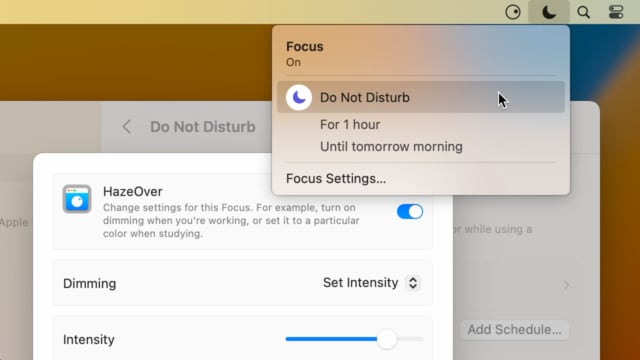
Set up a Focus Filter to toggle HazeOver dimming or set its intensity and color automatically depending on which Focus mode you have activated. For example, you could have dimming turned on when switching to a Work focus or get it set to a particular color when studying.
Read the Automation Guide for details and inspiration.
Echa un vistazo →
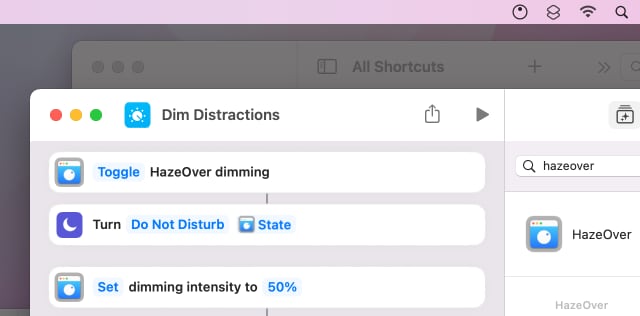
Control HazeOver dimming state and settings with Shortcuts app on macOS Monterey. Combine with other apps and settings to set up your perfect environment. For example, you can turn on HazeOver, Dark Mode, and Do Not Disturb with a single keyboard shortcut. On all macOS versions you can use AppleScript.
Read the Automation Guide for details and inspiration.
Echa un vistazo →
HazeOver 1.8.6 + Light/Dark Settings
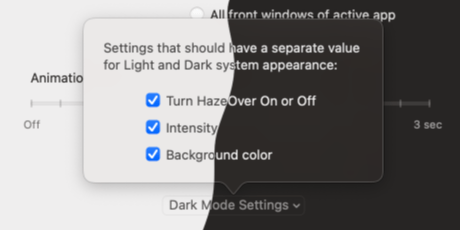
New: Dynamic settings for Light and Dark system appearance.
Dimming settings can be set to change automatically when using Auto Appearance on macOS Catalina (System Preferences > General). For example, dimming can switch on along with Dark Mode. Or have different dimming intensity and color when using the light appearance.
Such settings will be saved and applied independently for Dark and Light appearance. See HazeOver Preferences > Advanced > Dark Mode Settings.
Reseñas de clientes: 
Basado en 3133 valoraciones y reseñas recientes de Mac App Store en todo el mundo
Excelente y sencilla
Esta App es justo lo que andaba buscando para evitar distracciones, pues simplemente resalta lo que estas haciendo y obscurece todo lo demás, tanto como quieras. Con esto te centras en lo que haces y tu vista “no se va” hacia otras ventanas que tengas abiertas. La recomiendo!
Fa el que promet!… Molt útil per millorar la productivitat davant de la pantalla ...
Trobo que és una aplicació molt útil, simple i que ajudará a que millori la meva/teva productivitat davant de la pantalla pel fet de que ajuda a concentrar l’atenció davant de la finestra de l’aplicació amb la que estiguis treballant enfosquint tota la resta de pantalla, Crec que el seu preu és una mica elevat donat que només fa el que fa (enfosquir la pantalla darrera de la finestra de l’aplicació activa) però ho fa be, Crec que aquesta funcionalitat hauria d’estar inclosa “de sèrie” en MacOS (potser en Mission Control), Funciona perfectament en un MacBook Pro Retina de 15” con Yosemite 10.10.5, De moment, molt satisfet amb la compra, Espero que aquest comentari et sigui d’utilitat,
A permanent addition to my desktop
This program has redefined what I view as “comfortable” on my desktop, and it has become a permanent resident on my status bar. I rarely disable it, but love the fact that I can quickly and easily do so using the taskbar icon. It does exactly what it says. Five stars.
Better is use than theory
You don’t know how nice this is until you use it. It really does make concentrating on the given window easier; and yes, you always know what window you’re on. Glad I got this, highly recommend it.