HazeOver News and Updates 

HazeOver 1.9.9 + macOS 27 Golden Gate
- Updated for macOS 27 Golden Gate.
- Change HazeOver settings directly from Spotlight and assign quick keys to actions.
- Fixed: the Settings window could open unexpectedly when using the new Siri app.
- Fixed: menu bar icon scrolling did not work on macOS 27, or changed intensity unintentionally.
 Free Trial
 Try with Setapp

HazeOver 1.9.7 + macOS Tahoe and Liquid Glass
- Improved compatibility with macOS Tahoe and updated look for Liquid Glass.
- Fixed: quitting unexpectedly when using a third-party menu bar manager.
- Improved screen reader support and keyboard navigation following Voluntary Product Accessibility Template® audit.
Now you can adjust HazeOver settings from Spotlight and Control Center. See the updated Automation Guide.
Tip: If you use intense dimming and the menu bar gets too dark on macOS Tahoe, then go to System Settings > Menu Bar and turn on the “Show menu bar background” option.
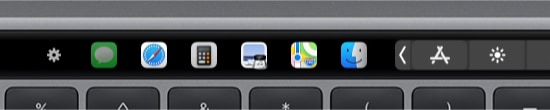
The app switcher for the Touch Bar got updated for macOS Tahoe and Liquid Glass. Now requires macOS 12, the last macOS version supported by every Mac with a Touch Bar.
Take a look →
The app for running scripts and commands with keyboard shortcuts or from the menu bar, now updated for macOS Tahoe and Liquid Glass.
Take a look →
“What HazeOver does is highlight the active window by dimming all background windows. That’s it. But it does this simple task with aplomb, and it makes a significant difference in the day-to-day usability of MacOS. Not just MacOS 26 Tahoe — all recent versions of MacOS suffer from a design that makes it difficult to distinguish, instantly, the frontmost (a.k.a. key) window from background windows. Making all background windows a little dimmer makes a notable difference.”
— John Gruber
Take a look →
HazeOver 1.9.6 + macOS Sequoia & Localization Updates

I like working with different languages. I speak English, Russian and Spanish, a bit of Japanese and can understand some German. Localizing an app is challenging but rewarding. That’s why HazeOver has supported multiple languages from the get go.
Over the years HazeOver has been localized into 33 languages with help from professional translators and regular users. But as changes are made and features are added, some text became out of date. Now the localization should be complete, including updates to the home and help pages in 24 languages.
Please let me know if you find mistakes or typos.

HazeOver 1.9.4 + macOS Sonoma
Customizable fading animation and minor bug fixes.

HazeOver Featured by Apple in App Store Stories
- What’s New in macOS Ventura — Take Focus Further
“macOS Ventura is here, bringing fresh ways to boost your productivity and creativity. Check out a few of its coolest new features—along with apps and games to get the most out of them.”
“Whether you’re working, playing, or spending time with family, setting up a Focus is a great way to establish boundaries. With the new Focus filters in macOS Ventura, apps can customize what you see based on the Focus you’ve enabled.”
- Get More Done With Shortcuts! — Manage Your Mac
“By letting you automate frequent or cumbersome tasks, Shortcuts has become a productivity favorite on Mac. […] Check out these Mac favorites that work with Shortcuts”
- Snap Screenshots Like a Pro — Highlight the important window
“HazeOver dims all but the top window to help you focus while working. Use it for a professional look when making screen captures and recordings.”

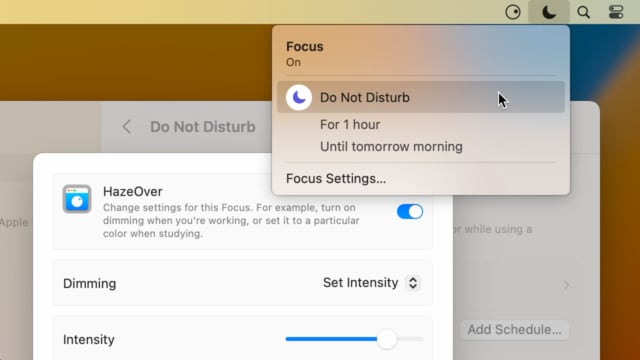
Set up a Focus Filter to toggle HazeOver dimming or set its intensity and color automatically depending on which Focus mode you have activated. For example, you could have dimming turned on when switching to a Work focus or get it set to a particular color when studying.
Read the Automation Guide for details and inspiration.
Take a look →
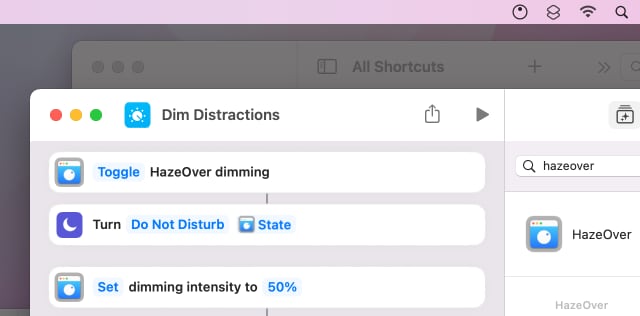
Control HazeOver dimming state and settings with Shortcuts app on macOS Monterey. Combine with other apps and settings to set up your perfect environment. For example, you can turn on HazeOver, Dark Mode, and Do Not Disturb with a single keyboard shortcut. On all macOS versions you can use AppleScript.
Read the Automation Guide for details and inspiration.
Take a look →
HazeOver 1.8.9 + New App Icon
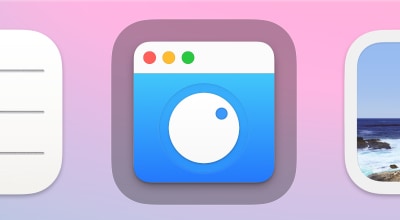
- Fresh new app icon to go with macOS Big Sur.
- Fixed: Displays tab option did not get updated.
- Updated for macOS Big Sur with native support for Macs with new Apple Silicon M1 chips.
- More options to override what Touch Bar shows for certain apps: Spaces and Quick Actions. In addition to Expanded Control Strip, “F1, F2, etc.” Keys, App Controls.

HazeOver 1.8.8 + Big Sur and Apple M1
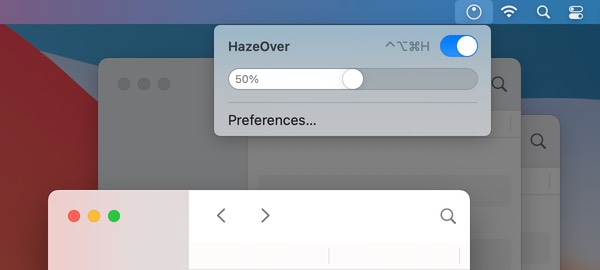
- New menu look to match the Control Center in macOS Big Sur.
- Hide some HazeOver menu items for a cleaner look.
- Native support for Macs with new Apple Silicon M1 chips.

HazeOver 1.8.6 + Light/Dark Settings
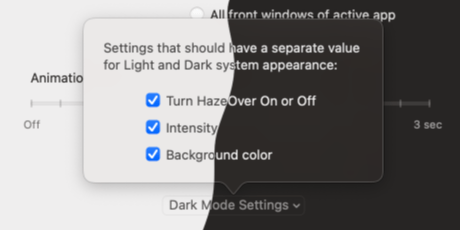
New: Dynamic settings for Light and Dark system appearance.
Dimming settings can be set to change automatically when using Auto Appearance on macOS Catalina (System Preferences > General). For example, dimming can switch on along with Dark Mode. Or have different dimming intensity and color when using the light appearance.
Such settings will be saved and applied independently for Dark and Light appearance. See HazeOver Preferences > Advanced > Dark Mode Settings.

YouTube does not play 4K videos in Safari. This extension comes to your help:
- It shows 4K badge in Safari toolbar if a YouTube video has 4K quality.
- To open the current page in another browser click the toolbar button.
- To skip YouTube ads Control-click the toolbar button.

HazeOver 1.8.5 + Catalina
- Improved compatibility with macOS Catalina.
- Keyboard shortcuts to adjust dimming intensity.

HazeOver story: How the distraction-dimming app was developed to reduce visual noise and promote productivity – based on an interview with the developer.
Take a look → HazeOver 1.8.4 Update
- Fixed: double-clicking menu bar icon to toggle dimming did not always work.
- “Disable When Using …” option can now be used for apps without Dock icon.
- Improved automatic Desktop revealing and support for Path Finder’s Desktop.
- Fixed wrong dimming for: dragging a window between screens; switching between windows of the same app on different screens.
HazeOver 1.8.3 Update
- Improved compatibility with Electron-based apps.
- Compatibility with Coherence mode of Parallels Desktop app.
- Fixed dimming of apps assigned to All Desktops (using Dock menu).
- Fixed flickering when switching Spaces with full-screen apps on multiple displays.
- Settings window now respects “Reduce Motion” accessibility preference.
Run commands and scripts using keyboard shortcuts or from the menu bar. You could set up AppleScript or Automator actions to turn on Dark Mode, hide the Dock and the menu bar or control HazeOver.
Take a look →
HazeOver 1.8 – Power Up the Dark Mode
Websites and many apps stay too bright even with the new macOS Dark Mode. Don’t let them disrupt your flow. HazeOver will dim all the bright spots in the background.
- Added support for macOS Mojave and Dark Mode appearance.

HazeOver 1.7.9 Update
- Minor bug fixes for macOS High Sierra.
- Fixed: automating HazeOver using AppleScript did not work.

HazeOver 1.7.7 + Touch Bar
- Improved compatibility with AMD Radeon Pro graphic chipsets;
- Adjust dimming intensity and color using Touch Bar (in Settings window).
Speaking of which, try Touch Switcher for faster app switching.

HazeOver 1.7: Splash of Color
Change the shading color with a new option. Adjust background tint and brightness for better work at night. Having orange tint should reduce overall blue light emission without sacrificing color accuracy of the front window.
- Fixed: undesired dimming in Mission Control mode;
- Fixed: HazeOver got confused by some third-party tweaks (for example, Bartender app);
- Fixed: focused full-screen app on a secondary screen might get dimmed.

HazeOver 1.6: Interactive Status Icon
- New interactive menu bar icon
- Press the Fn key to turn dimming off when dragging files around
- Animation duration can now be set down to 0.1 s
- Added “Helpful Tips” menu item
- Adjust intensity by scrolling over menu bar icon with a regular mouse too
- Fixed: Desktop was not automatically revealed on Mavericks

HazeOver 1.5: Distraction Dimmer
Say hello to the fun new “Dimmer” design! Use trackpad rotation gesture to literally turn the brightness of your distractions down. Or place mouse pointer over HzO menu bar icon and scroll to quickly adjust dimming intensity.
Now you can choose how you want to dim multiple displays. You can either highlight one screen only or have a highlighted window on each screen.
Are you ready? Aye, Aye, El Capitan! HazeOver support is on board.
Update 1.4.4: Multiple Monitor Support
Thanks everyone who requested better multi-screen support and especially those who helped me out with beta-testing.
- HazeOver now highlights a front window on each display individually.
- Dimming for apps launched using Spotlight is fixed.
- Bonus trick: toggle HazeOver status by double-clicking HzO icon in the menu bar.

A short story about how I’ve designed the latest version of HazeOver icon.
Take a look →
HazeOver is a hobby project that I’ve been working on since 2007 to improve my own productivity. This is a story of its development and two major milestones that lifted it to the top Mac App Store rankings at some point.
Take a look →
Fresh Look and Bug Fixes
Version 1.4.2 boasts a new modern icon. Switching to full-screen applications or interacting with the desktop automatically disables HazeOver dimming. Gone are problems related to sleep and automatic graphics switching.

Yosemite & Mavericks Compatibility
Version 1.4 brings new Mac OS X versions compatibility along with improved animation technique and more accurate dimming window ordering.
HazeOver 1.3: Snappy and Crystal Clear
HazeOver now can dim inactive windows instantly without any noticeable delays. Settings window is also treated with interactive Retina-quality icons.
Rawwwr. Lion Update
HazeOver and Lion did not get along sometimes. But now they are BFFs.
Rejoice. HazeOver 1.2 is out in the wild
The first gang of the most wanted features is seized. No need for further introduction. Go grab it!
Hold Your Breath for an Update
Well, maybe not that soon but HazeOver 1.2 is already sitting in the line, waiting for a review. Does it carry anything good? You bet! Customizable fading animation, quick on/off and intensity settings in the menu bar. Oh, yeah, and an option to highlight front windows of an active application instead of just a single window.
That’s it. But just for now.
HazeOver hits Top Charts on the Mac App Store
Thank you, Samuel Gibbs for the publication on TUAW. Lots of feedback and suggestions coming in. Oh, well. Now I gotta make a new version.
Here’s a run down of the requests:
- Powered up menu bar icon: set intensity or quickly switch HazeOver on/off.
- Some sort of per-app customization. Like don’t fade some apps or keep all windows of an app lit instead of only active one. That might be tricky.
- Disable or adjust dimming animation. Note that HazeOver acts with a delay instead of real-time. That way it has minimum impact on your system performance. To mask this delay there’s an animation. Otherwise dimming would look sporadic and distracting.
I’ll try to keep up with your requests so keep them coming.
HazeOver is available on the Mac App Store
HazeOver has just hit the Mac App Store. The app is available in 17 languages.
Waiting in the line at the App Store
HazeOver just been submitted to the Mac App Store. So what’s new then?
- Adjust dimming intensity to your liking using new Settings window.
- Hide HazeOver system menu bar icon if you wish.
- Got some displays connected? No problem. HazeOver will dim all of them appropriately.
- Enabling/Disabling HazeOver is a matter of clicking a single checkbox. Adding to or removing from Login Items is handled automatically.
An update is coming up
The first version of the HazeOver utility was intentionally simple. No settings, no treatment for special cases. Thanks to your warm feedback it’s now clear that it makes sense to carry on. Settings and Multi-Monitor Support are on their way.