


HazeOver – Ablenkungsdimmer für Mac
Reduziere Ablenkungen und konzentriere dich auf deine aktuelle Aufgabe
Zu viele Fenster zu verwalten? Ins falsche Fenster getippt? Großes Display? Oder verloren zwischen mehreren Monitoren? HazeOver ist für dich da! Diese App hebt automatisch das aktive Fenster hervor, indem sie die Hintergrundfenster dimmt.
Die aktuelle Version erfordert macOS Ventura 13 oder neuer. Siehe andere Versionen. Kompatibel mit macOS 27 Golden Gate. Kostenlose Testversion
 Mit Setapp testen
Wie du die Produktivität auf dem Mac mit HazeOver steigerst
- Hilf dir selbst, dich auf eine Sache zu konzentrieren. Vor allem, wenn du dich leicht ablenken lässt.
- Verbringe weniger Zeit mit der Fensterverwaltung. Das Durcheinander wird dich nicht mehr stören.
Du musst Fenster nicht mehr minimieren, schließen oder verstecken, um deinen Arbeitsbereich ordentlich zu halten. - Erkenne sofort, welches Fenster aktiv ist – dank zusätzlichem Kontrast.
Tippe, füge ein und nutze Tastaturkurzbefehle, ohne dich erst vergewissern zu müssen. - Hast du ein größeres Display? Dann macht Vollbild vielleicht weniger Sinn.
HazeOver hilft dir, dich nicht von zu vielen Fenstern überwältigt zu fühlen. - Mehrere Monitore? Sieh, welcher Bildschirm aktiv ist, oder hebe Fenster auf jedem Monitor hervor.
- Hilft, die Augen zu entlasten und die Blendung insgesamt zu verringern.
Ergänzt den Dunkelmodus und dimmt helle Inhalte dahinter. - Arbeiten in der Nacht? Senke die Oberflächenhelligkeit, ohne die Lesbarkeit oder Farbgenauigkeit des aktiven Fensters zu beeinträchtigen.
- Dafür gemacht, dauerhaft auf deinem Mac zu laufen – über die Jahre sorgfältig optimiert, um sehr wenig Arbeitsspeicher und Energie zu verbrauchen.
Starkes Multitasking zehrt an deinen Kräften. Webseiten, E-Mails, Chat-Nachrichten und Lolcats 😼 starren dich aus dem Hintergrund an – alle kämpfen um deine Aufmerksamkeit. Und du hast nur begrenzt davon.
Du bist mitten in der Arbeit. Dann ein Fenster hier, ein anderes dort, du versteckst und minimierst, sie häufen sich immer weiter an… Sehr gut. Jetzt bist du überfordert und aus dem Konzept. Atme durch, schalte HazeOver ein und konzentriere dich endlich auf das Wesentliche.
HazeOver hebt automatisch das Fenster oder die App im Vordergrund hervor, während du wechselst. Weniger wichtige Dinge verblassen sanft in den Hintergrund und helfen dir dabei, fokussiert und produktiv zu bleiben.
Passe die Dimmintensität und Animationsgeschwindigkeit an deine Vorlieben an – ob es sich um eine sanfte Schattierung zur Aufmerksamkeitslenkung oder einen starken dunklen Hintergrund für totale Immersion handelt.
- Der Schreibtisch wird automatisch sichtbar gemacht, wenn er verwendet wird.
- Schalte die Schattierung mit einem Tastaturkurzbefehl um oder passe die Intensität mit einer Geste an.
- Verwende separate Dimmeinstellungen für dunkles und helles Erscheinungsbild.
- Drücke die fn-Taste, um das Dimmen beim Ziehen zwischen Apps schnell zu deaktivieren.
- Steuere oder automatisiere HazeOver mit der Kurzbefehle-App, Fokusfiltern und AppleScript.
Verbessere deinen Arbeitsablauf und Augenkomfort mit HazeOver.
Hilft HazeOver wirklich? Es erschien in







 Von Apple vorgestellt im Mac App Store

„Ich nutze die App schon so lange, dass ich regelrecht irritiert bin, wenn ich an einem Mac ohne HazeOver sitze.“

„Wenn es um Produktivität geht, können die richtigen Tools den entscheidenden Unterschied ausmachen. […] Entdecke diese Produktivitäts-Perlen“

„HazeOver dimmt alle Fenster bis auf das aktive […], damit du dich ganz auf deine Arbeit konzentrieren kannst. Verwende die App für professionell wirkende Bildschirmfotos und Videoaufnahmen deines Bildschirms.“

„Kurzbefehle sind auf dem Mac mittlerweile die erste Anlaufstelle für mehr Produktivität – vor allem weil du mit ihnen regelmäßige oder mühselige Aufgaben automatisierst. […] Für die folgenden beliebten Mac-Apps sind Kurzbefehle besonders prädestiniert“

„Das volle Fokus-Potenzial […] Mithilfe der neuen Fokus-Filter in macOS Ventura siehst du in deinen Apps nichts anderes als das, was deinem aktiven Fokus entspricht.“
Neuigkeiten & Updates 

HazeOver 1.9.9 + macOS 27 Golden Gate
- Aktualisiert für macOS 27 Golden Gate.
- Ändere HazeOver-Einstellungen direkt über Spotlight und weise den Aktionen Schnelltasten zu.
- Behoben: Das Einstellungsfenster konnte sich bei Verwendung der neuen Siri-App unerwartet öffnen.
- Behoben: Das Scrollen über dem Menüleistensymbol funktionierte unter macOS 27 nicht oder änderte ungewollt die Intensität.

“What HazeOver does is highlight the active window by dimming all background windows. That’s it. But it does this simple task with aplomb, and it makes a significant difference in the day-to-day usability of MacOS. Not just MacOS 26 Tahoe — all recent versions of MacOS suffer from a design that makes it difficult to distinguish, instantly, the frontmost (a.k.a. key) window from background windows. Making all background windows a little dimmer makes a notable difference.”
— John Gruber
Mal reinschauen →
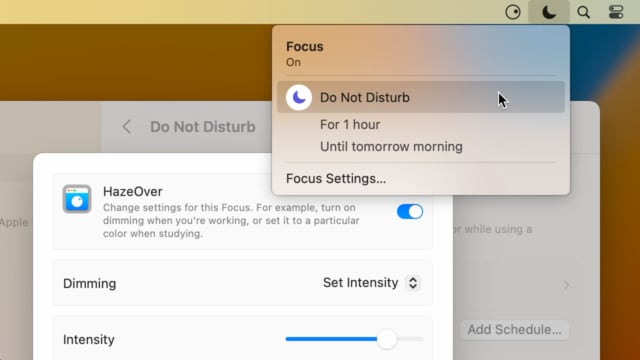
Set up a Focus Filter to toggle HazeOver dimming or set its intensity and color automatically depending on which Focus mode you have activated. For example, you could have dimming turned on when switching to a Work focus or get it set to a particular color when studying.
Read the Automation Guide for details and inspiration.
Mal reinschauen →
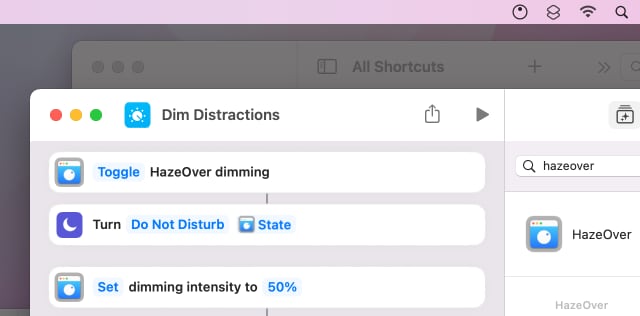
Control HazeOver dimming state and settings with Shortcuts app on macOS Monterey. Combine with other apps and settings to set up your perfect environment. For example, you can turn on HazeOver, Dark Mode, and Do Not Disturb with a single keyboard shortcut. On all macOS versions you can use AppleScript.
Read the Automation Guide for details and inspiration.
Mal reinschauen →
HazeOver 1.8.6 + Light/Dark Settings
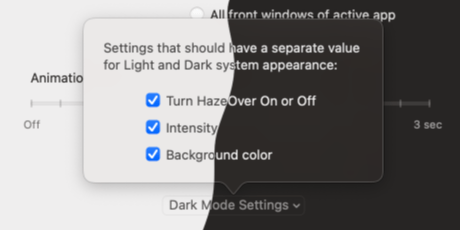
New: Dynamic settings for Light and Dark system appearance.
Dimming settings can be set to change automatically when using Auto Appearance on macOS Catalina (System Preferences > General). For example, dimming can switch on along with Dark Mode. Or have different dimming intensity and color when using the light appearance.
Such settings will be saved and applied independently for Dark and Light appearance. See HazeOver Preferences > Advanced > Dark Mode Settings.
Kundenrezensionen: 
Basierend auf 3133 aktuellen Bewertungen und Rezensionen aus dem Mac App Store weltweit
Tut was es soll...
nämlich das im "Click-Focos" stehende Fenster zu highlighten. Bei einigen Anwendungsfällen, gerade bei kleineren Fenstern ohne Vollbildfunktion nützlich (Textbearbeitung, Browsen, Video). Einstellungsmöglichkeiten kann man auch das Nötigste, wie Intensität des Abdunkelns und Dauer der Animation.
Sehr praktisch!
Diese App macht es wirklich leichter, sich nur au fein Fenster zu konzentrieren. [...]
A permanent addition to my desktop
This program has redefined what I view as “comfortable” on my desktop, and it has become a permanent resident on my status bar. I rarely disable it, but love the fact that I can quickly and easily do so using the taskbar icon. It does exactly what it says. Five stars.
Better is use than theory
You don’t know how nice this is until you use it. It really does make concentrating on the given window easier; and yes, you always know what window you’re on. Glad I got this, highly recommend it.