


HazeOver ตัวลดสิ่งรบกวนสำหรับ Mac
ลดสิ่งรบกวนและมุ่งความสนใจไปที่งานปัจจุบันของคุณ
มีหน้าต่างมากเกินไปที่ต้องจัดการ? เคยพิมพ์ไปผิดหน้าต่าง? หน้าจอใหญ่? หรือบางทีหลงทางในหลายจอภาพ? HazeOver เหมาะสำหรับคุณ! แอปนี้จะเน้นหน้าต่างที่ใช้งานอยู่โดยอัตโนมัติด้วยการทำให้หน้าต่างพื้นหลังมืดลง
เวอร์ชั่นปัจจุบันต้องใช้ macOS Ventura 13 ขึ้นไป ดูเวอร์ชั่นอื่น ใช้งานได้กับ macOS 27 Golden Gate เวอร์ชั่นทดลอง
 ลองใช้กับ Setapp
วิธีเพิ่มประสิทธิภาพการทำงานบน Mac ด้วย HazeOver
- ช่วยให้คุณมุ่งความสนใจกับสิ่งเดียวในแต่ละครั้ง โดยเฉพาะถ้าคุณวอกแวกง่าย
- ใช้เวลาน้อยลงในการจัดการหน้าต่าง ความยุ่งเหยิงจะไม่รบกวนคุณอีกต่อไป
ไม่จำเป็นต้องย่อ ปิด หรือซ่อนหน้าต่างเพื่อให้พื้นที่ทำงานเป็นระเบียบ - คอนทราสต์ที่เพิ่มขึ้นช่วยให้เห็นได้ทันทีว่าหน้าต่างไหนกำลังใช้งานอยู่
พิมพ์ วาง และกดแป้นพิมพ์ลัดได้โดยไม่ต้องหยุดคิด - มีหน้าจอใหญ่? การใช้เต็มหน้าจออาจไม่สมเหตุสมผล
HazeOver ช่วยให้คุณไม่รู้สึกครอบงำด้วยหน้าต่างมากเกินไป - หลายจอภาพ? ดูว่าหน้าจอไหนกำลังใช้งานอยู่ หรือเน้นหน้าต่างในแต่ละจอภาพ
- ช่วยลดอาการปวดตาและแสงจ้าโดยรวม
เสริมโหมดมืดด้วยการทำให้เนื้อหาสว่างที่อยู่ด้านหลังมืดลง - ทำงานตอนกลางคืน? ลดความสว่างของอินเทอร์เฟซโดยไม่เสียการอ่านหรือความแม่นยำของสีในหน้าต่างที่ใช้งานอยู่
- ออกแบบมาให้ทำงานบน Mac ของคุณตลอดเวลา และปรับแต่งอย่างพิถีพิถันมาตลอดหลายปีเพื่อให้ใช้หน่วยความจำและพลังงานเพียงเล็กน้อย
การทำงานหลายอย่างพร้อมกันแบบหนักดูดพลังงานของคุณ หน้าเว็บ อีเมล ข้อความแชท และ lolcats 😼 จ้องมองคุณจากพื้นหลัง ทั้งหมดต่อสู้เพื่อความสนใจของคุณ และคุณมีจำกัด
คุณกำลังจดจ่ออยู่กับงาน แล้วก็มีหน้าต่างนี้ขึ้นมา อีกอันตามมา คุณซ่อนและย่อหน้าต่างไปเรื่อยๆ แต่มันก็สะสมขึ้นเรื่อยๆ… เยี่ยมเลย ตอนนี้คุณรู้สึกท่วมท้นและหลุดออกจากเส้นทางแล้ว หายใจลึกๆ เปิดใช้ HazeOver และในที่สุดก็มุ่งสมาธิกับสิ่งที่สำคัญ
HazeOver เน้นหน้าต่างหรือแอปที่อยู่ด้านหน้าสุดโดยอัตโนมัติเมื่อคุณสลับ สิ่งที่สำคัญน้อยกว่าค่อยๆ จางลงไปเป็นพื้นหลัง ช่วยให้คุณมีสมาธิและมีประสิทธิภาพ
ปรับแต่งความเข้มของการทำหน้าต่างมืดและความเร็วการเคลื่อนไหวตามความชอบของคุณ ไม่ว่าจะเป็นเงาที่นุ่มนวลเพื่อนำทางความสนใจของคุณ หรือพื้นหลังมืดแบบเข้มข้นเพื่อการดื่มด่ำทั้งหมด
- เดสก์ท็อปจะถูกเปิดเผยโดยอัตโนมัติเมื่อใช้งาน
- สลับการแรเงาด้วยแป้นพิมพ์ลัดหรือปรับความเข้มด้วยคำสั่งนิ้ว
- ใช้การตั้งค่าการทำหน้าต่างมืดแยกกันสำหรับรูปลักษณ์มืดและสว่าง
- กดปุ่ม fn เพื่อปิดการทำหน้าต่างมืดชั่วคราวขณะลากระหว่างแอป
- ควบคุมหรือทำงานอัตโนมัติ HazeOver ด้วยแอป คำสั่งลัด, ฟิลเตอร์โฟกัส และ AppleScript
ปรับปรุงเวิร์กโฟลว์และความสบายตาของคุณด้วย HazeOver
HazeOver ช่วยได้จริงหรือ? ได้รับการแนะนำใน







 แนะนำโดย Apple บน Mac App Store

“ฉันใช้ HazeOver มานานมาก จนบางทีก็งงไปเลยเวลาที่ต้องไปใช้ Mac ที่ไม่มีแอปนี้”

“เมื่อพูดถึงเรื่องการเพิ่มประสิทธิภาพแล้ว แน่นอนว่าเครื่องมือที่ใช่จะสร้างความแตกต่างได้เยอะเลย […] ลองใช้แอปเพิ่มประสิทธิภาพชั้นยอดเหล่านี้”

“HazeOver จะดับไฟทุกอย่างยกเว้น[หน้าต่าง]บนสุดเพื่อให้คุณโฟกัสกับสิ่งที่ทำอยู่ เหมาะสำหรับการถ่ายภาพหรือวิดีโอของหน้าจอเพื่อให้ดูจริงจังมากขึ้นด้วย”

“คำสั่งลัดคือเคล็ดลับที่จะช่วยให้คุณใช้ Mac เครื่องโปรดทำงานได้อย่างมีประสิทธิภาพมากขึ้น เพราะคำสั่งลัดจะช่วยจัดการทาสก์ต่างๆ ที่ยุ่งยากหรือต้องทำบ่อยๆ ให้คุณโดยอัตโนมัติ […] มาดูแอปโปรดที่ทำงานร่วมกับแอปคำสั่งลัดใน Mac ได้ดีกันเลย”

“Take Focus further […] With the new Focus filters in macOS Ventura, apps can customize what you see based on the Focus you’ve enabled.”
ข่าวสารและอัปเดต 

HazeOver 1.9.9 + macOS 27 Golden Gate
- อัปเดตสำหรับ macOS 27 Golden Gate
- เปลี่ยนการตั้งค่า HazeOver โดยตรงจาก Spotlight และกำหนดปุ่มด่วนให้กับการทำงาน
- แก้ไข: หน้าต่างการตั้งค่าอาจเปิดขึ้นโดยไม่คาดคิดเมื่อใช้แอป Siri ใหม่
- แก้ไข: การเลื่อนเหนือไอคอนในแถบเมนูไม่ทำงานบน macOS 27 หรือทำให้ความเข้มเปลี่ยนโดยไม่ได้ตั้งใจ

“What HazeOver does is highlight the active window by dimming all background windows. That’s it. But it does this simple task with aplomb, and it makes a significant difference in the day-to-day usability of MacOS. Not just MacOS 26 Tahoe — all recent versions of MacOS suffer from a design that makes it difficult to distinguish, instantly, the frontmost (a.k.a. key) window from background windows. Making all background windows a little dimmer makes a notable difference.”
— John Gruber
ไปดูกัน →
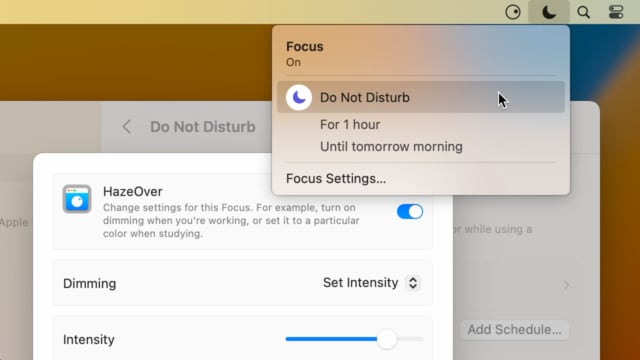
Set up a Focus Filter to toggle HazeOver dimming or set its intensity and color automatically depending on which Focus mode you have activated. For example, you could have dimming turned on when switching to a Work focus or get it set to a particular color when studying.
Read the Automation Guide for details and inspiration.
ไปดูกัน →
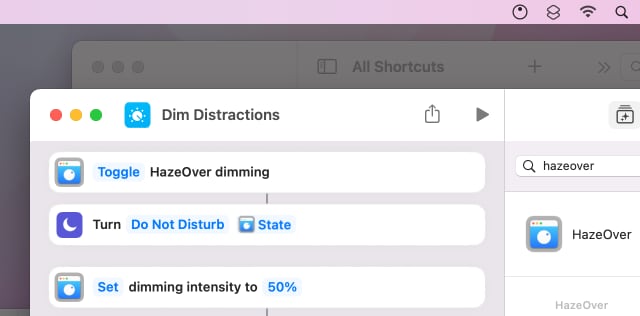
Control HazeOver dimming state and settings with Shortcuts app on macOS Monterey. Combine with other apps and settings to set up your perfect environment. For example, you can turn on HazeOver, Dark Mode, and Do Not Disturb with a single keyboard shortcut. On all macOS versions you can use AppleScript.
Read the Automation Guide for details and inspiration.
ไปดูกัน →
HazeOver 1.8.6 + Light/Dark Settings
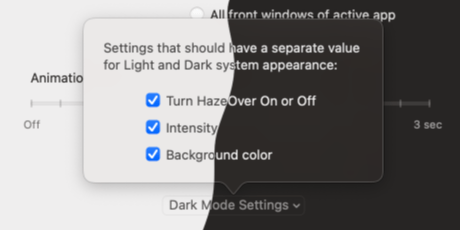
New: Dynamic settings for Light and Dark system appearance.
Dimming settings can be set to change automatically when using Auto Appearance on macOS Catalina (System Preferences > General). For example, dimming can switch on along with Dark Mode. Or have different dimming intensity and color when using the light appearance.
Such settings will be saved and applied independently for Dark and Light appearance. See HazeOver Preferences > Advanced > Dark Mode Settings.
รีวิวลูกค้า: 
จากคะแนนและรีวิว 3133 รายการล่าสุดจาก Mac App Store ทั่วโลก
A permanent addition to my desktop
This program has redefined what I view as “comfortable” on my desktop, and it has become a permanent resident on my status bar. I rarely disable it, but love the fact that I can quickly and easily do so using the taskbar icon. It does exactly what it says. Five stars.
Better is use than theory
You don’t know how nice this is until you use it. It really does make concentrating on the given window easier; and yes, you always know what window you’re on. Glad I got this, highly recommend it.
Brilliantly Simple
App that makes you go, “Where have you been all my Mac life?”
Worth the money, worth the time
This app has definitely helped with making my productive life easier. Let me tell you that it little popups are an annoyance to you, then this app will definitely help you concentrate on one thing at a time. It is now in my must-have list and should be in yours too!